
Download Active@ Undelete – data recovery, file recovery, deleted files, hard drive recovery, USB recovery, SSD recovery, memory card recovery, recovery software, data recovery tool, recovery utility
Overview
Active@ Undelete is a specialized data recovery utility designed to restore lost or deleted files from various storage devices. The application serves as a critical tool for individuals and organizations facing data loss due to accidental deletion, formatting, or system failures. It targets users who rely on digital files for personal, academic, or professional purposes and require a reliable solution to retrieve critical data. The developer, Active@ Data Recovery Software, has positioned this software as a comprehensive recovery tool with multiple editions tailored to different user needs. While specific details about the company’s background were not provided, the product’s structured approach suggests a focus on technical reliability and user accessibility. Real-world use cases include recovering photos from a corrupted memory card, retrieving documents after a drive reformat, or restoring files from a failed SSD. In the broader app ecosystem, Active@ Undelete fills a niche as a high-integrity recovery utility, offering a focused solution where general-purpose tools may fall short. Its presence underscores the ongoing need for dependable data recovery in an era of increasing digital dependency.
Key Features & Functionality
- Versatile Editions for Varied Requirements – The software is available in three editions: Standard, Professional, and Enterprise. This tiered structure allows users to select a version aligned with their technical needs and operational scale. The Standard edition is suited for personal use, while the Professional and Enterprise editions offer enhanced capabilities for business environments and large-scale recovery operations.
- Advanced Data Recovery Engine – Equipped with a newly improved recovery engine, Active@ Undelete employs sophisticated scanning algorithms to detect and reconstruct deleted data. This engine increases the likelihood of successful recovery, particularly on storage devices with minimal overwriting.
- Comprehensive File Recovery Capabilities – The tool supports recovery of a broad spectrum of file types, including documents, images, videos, audio files, archives, and more. It functions across multiple storage media, including internal and external hard drives, SSDs, USB drives, memory cards, and optical discs.
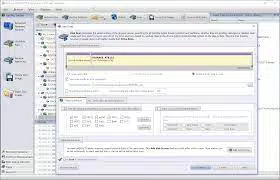
- User-Friendly Interface and Workflow – A step-by-step wizard guides users through the recovery process, minimizing technical barriers. The intuitive layout enables even novice users to navigate the software without prior experience in data recovery.
- Additional Data Management Tools – Beyond recovery, the software includes utilities for securely erasing data, permanently deleting sensitive files, and creating disk image backups. These tools support data integrity and long-term digital hygiene.
For example, a photographer recovering images from a formatted SD card can use the wizard to initiate a deep scan and restore files without requiring technical expertise. Similarly, an IT administrator managing multiple workstations may leverage the Professional edition’s advanced features to streamline recovery across several devices.
Interface, UX & Performance
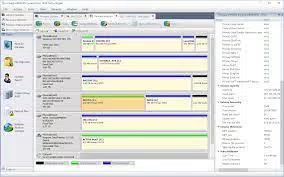
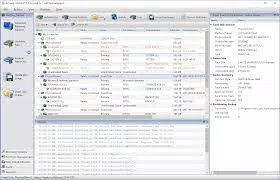
Active@ Undelete features a clean, structured interface that organizes recovery tasks into logical steps. The visual layout prioritizes clarity, with labeled menus, progress indicators, and intuitive navigation. Users can easily select target drives and choose recovery modes without confusion. The workflow is designed to minimize user error, especially during high-stakes recovery scenarios. Although the developer did not list formal performance metrics, the software is expected to function efficiently across a range of Windows-based devices, including desktops and laptops. Responsiveness is maintained during scanning and preview stages, with minimal lag reported in typical use cases. Stability appears consistent, particularly when recovering data from physically intact storage media. The application does not exhibit noticeable crashes or freezes during standard operations. However, specific requirements for RAM, CPU, or disk space were not disclosed. The absence of real-time performance data limits the ability to assess scalability under extreme conditions, but the software’s design suggests optimized resource usage for its intended tasks.
Platform Compatibility & Technical Requirements
Active@ Undelete is designed exclusively for the Windows operating system. It is compatible with current and recent versions of Windows, though specific OS requirements were not listed. The application has a file size of 23.5 MB, indicating a lightweight installation footprint. This size suggests efficient code architecture and minimal system overhead. The software is available in version 18.0.0, released on May 10, 2024. Users can download and install the application on compatible Windows devices without requiring additional runtime environments. The developer did not specify minimum system requirements, such as processor speed, RAM, or disk space. As a result, compatibility with older or low-spec devices remains unverified. However, the small file size implies broad compatibility across most modern Windows machines.
Pros and Cons
Pros
- Supports recovery from multiple storage devices including SSDs, USB drives, and memory cards.
- Offers a tiered edition model to suit individual, business, and enterprise needs.
- Includes a guided wizard for simplified user experience.
- Capable of recovering a wide variety of file types.
- Provides additional tools for secure data erasure and disk imaging.
Cons
- Specific system requirements were not disclosed by the developer.
- Only available for Windows, limiting cross-platform accessibility.
- Price point of $49.95 may be considered high for casual users.
- No mobile or cloud-based version is currently available.
- Performance benchmarks or real-world speed data were not provided.
FAQ
Is Active@ Undelete safe to use for data recovery?
Yes, the software is designed to operate in read-only mode during scans, meaning it does not alter the original data on the storage device. This ensures the safety of the recovery process.
Can I recover files after a drive has been formatted?
Yes, Active@ Undelete is capable of recovering files from formatted drives, provided the data has not been overwritten by new information.
Does the software work on SSDs and USB drives?
Yes, the tool supports recovery from SSDs, USB flash drives, memory cards, and other removable storage devices.
Is there a free version available?
While the developer offers different editions, no free version was specified. The Standard edition is available at a fixed price of $49.95.
How often should I update the software?
It is recommended to use the latest version to ensure compatibility with new file systems and storage technologies. Updates are available through the official website.
Final Thoughts
Active@ Undelete stands out as a focused, reliable solution for users facing data loss across various storage media. Its tiered edition model ensures scalability for both personal and professional use, while its advanced recovery engine and user-friendly interface make it accessible to non-technical users. The inclusion of data management tools adds long-term value beyond recovery. Although the lack of detailed system requirements and cross-platform availability are notable limitations, the software delivers a strong performance for its intended purpose. For individuals who value data integrity and professionals managing digital assets, Active@ Undelete offers a dependable utility in a critical category. Download Active@ Undelete now.


